
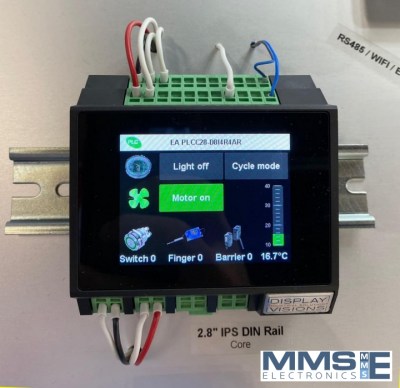
The compact PLC EA PLCC28-DI4R4AR features a vibrant 2.8-inch (320x240) colour IPS touchscreen display with touch-panel for visualizing data and entering commands. The EA PLCC28-DI4R4AR offers 8 digital inputs, 4 relay outputs, 4 analog inputs (0-10V or 4-20mA) and Wi-Fi, RS-485 and Ethernet connectivity. This PLC can automatically network with up to 50 remote HMI displays using Ethernet, Wi-Fi, and RS-485 interfaces. This means you can view process data, enter parameters, and control your system from multiple locations simultaneously. You can assign the remote display location via software, allowing to show data on one display and enter parameters on another. Further expansion to other I/O modules is possible via the RS-232 port. Supply voltage for the EA PLCC28-DI4R4AR is 12V to 24V.
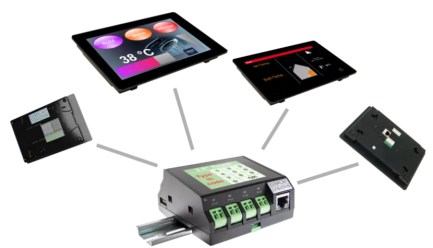
4 display sizes are available as remote HMI EA PLCS28-DS (2.8"), EA PLCS43-DS (4.3"), EA PLCS70-DS (7.0") and EA PLCS101-DS (10.1). All HMI displays feature a high-quality, high-brightness IPS screen with wide viewing angle, ensuring excellent readability even in direct sunlight. The HMI's can be mounted on walls, flush-mounted, or installed on top-hat rails. Supply voltage for the HMI displays is 6V to 24V DC.
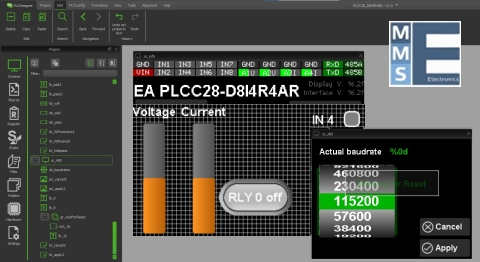
The PLC is programmed with the free-of-charge Windows™ PLCdesigner tool which provides a user-friendly graphical editor to help you create interactive pages, menu layouts and controls very quickly.
Features
- 8 Digital Inputs and 4 Analog Inputs (0-10V or 4-20mA)
- 4 Relay Outputs
- Wi-Fi, RS-485, RS-232 and Ethernet to satellite displays
- Integrated 2.8" display with PCAP touch-panel
- Connect to upto 50 remote/satellite displays
- Colour High bright, Sunlight readable display
- Supports multiple supply voltages
- Onboard Real-Time clock
- Program via USB port with uniPLCDesigner
- Free Windows™ PLCDesigner development software
 Click here to view the hardware manual for EA PLCC028-D8I4R4AR (External link to DISPLAY VISIONS website).
Click here to view the commands manual for EA PLCC028-D8I4R4AR (External link to DISPLAY VISIONS website).
Connect HMI seamlessly with EA PLCC28
| Partnumber | Resolution | Module size | Touch-screen |
|---|---|---|---|
| EA PLCS028 | 320x240 | 2.8" 84x58 mm | PCAP |
| EA PLCS043 | 480x272 | 4.3" 114x84 mm | PCAP |
| EA PLCS070 | 1024x600 | 7.0" 190x125 mm | PCAP |
| EA PLCS101 | 1280x800 | 10.1 260x185 mm | PCAP |
PLCDesigner software
This powerful controller offers unmatched personalisation. Display your company logo and colours directly on the PLC screen and custom-style the controls to perfectly align with your brand identity. Give your product a truly professional and bespoke finish that stands out.
The Design Process is Simple:
- Start by downloading the free PLCDesign software. The uniTFTDesigner includes the PLC and HMI Designer.
- Design the user interface exactly as you imagined it using an intuitive drag-and-drop environment.
- Easily place touch-buttons, pictures, text boxes, gauges, bargraphs, and keypads.
- Build multi-level navigation with 2nd, 3rd, or more menu screens to manage complex functions.
- Complete the setup by defining commands within the macro code.
Download PLCDesigner software
Download the FREE PLCDesigner software specially designed to program the compact PLC. Bringing the display and display communication to the forefront. The software is packed with easy to follow examples that run inside the desktop display simulator even without connecting any hardware.
- Drag and drop software IDE
- Create gauge instruments and graphs
- Display simulator and debugger
- Create screen layouts and macro functions
- Download data via USB to display memory
- Many program examples included
- Intelligent code completion and help function

Learn with the uniTFT / PLCDesigner software
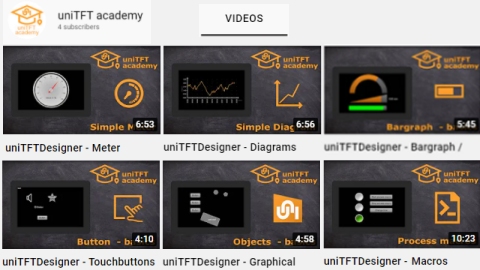
To make the experience with the uniTFT/PLCDesigner software as smooth as possible many examples are available from within the software. More educational video's are available on the Display Visions YouTube channel.
- Create touch buttons, radio buttons and keyboards
- Create gauge instruments and graphs
- Create string, spin boxes and bar graphs
- Create If then Else statements
- Use mathematical functions
- Use data arrays

Which HMI is right for you?
EA HMI with Modbus RTU/CTP
- Connect to any PLC with Modbus RTU/TCP
- Size: 2.8", 4.3", 7.0", 10.1", 12.0"
- Stylish enclosure with IPS colour display
- PCAP touch-screen
- High brightness display 1000cd/m²
- Create screen layouts and macro functions
- Download data to display flash memory
- Supported by the free HMI Designer software
- Supply voltage 6V .. 30V DC
- RS-485, Wi-Fi or LAN options
link to Modbus HMI products and datasheets
EA HMI with a SMART uniTFT display
- Size: 2.8", 4.3", 7.0", 10.1"
- Stylish enclosure with IPS colour display
- PCAP touch-screen
- High brightness display 1000cd/m²
- Control the display and the application
- Format and display incoming datastream
- Powerful graphic functions, pinch and zoom
- Supported by new uniTFTDesigner software
- Supply voltage 6V .. 30V DC
- RS-485, RS-232, Wi-Fi or LAN options
link to products and datasheet