
The new HMI product lines from DISPLAY VISIONS combine technical brilliance with economic efficiency. The focus is on features that are tailored to the requirements of industrial environments. The expansion into this business area is the company’s answer to the increasing demand and technological advancements in HMI solutions in the field of industrial automation. The EA HMIs are a cut above the standard HMIs by "big-box" manufacturers. DISPLAY VISIONS offer a wide variety of display sizes, high industrial quality, high brightness 1,000 cd/m² making the product standout even in sunlight conditions and no licence fees.
5 HMI display sizes are available 2.8", 4.3", 7.0", 10.1" and 12.0". All HMI displays feature a high-quality, high-brightness IPS screen with wide viewing angle, ensuring excellent readability even in direct sunlight. The HMI's can be mounted on walls, flush-mounted, or installed on top-hat rails. Supply voltage for the HMI displays is 10V to 30V DC.
The EA HMI are programmed with the free-of-charge Windows™ HMIdesigner tool which provides a user-friendly graphical editor to help you create interactive pages, menu layouts and controls very quickly. All HMIs are available from MMS Electronics Ltd authorised UK distributor for DISPLAY VISIONS.
Features
- Available in 2.8", 4.3", 7.0", 10.1" and 12.0"
- Modbus RTU/TCP, Slave and Master mode
- RS-485, Wi-Fi and LAN
- Integrated with PCAP touch-panel
- High brightness 1,000 cd/m², Sunlight readable HMI
- Supports multiple supply voltages 10 to 30V DC
- Free Windows™ HMIDesigner development software
 Click here to view the online hardware manual for EA HMI serie (External link to DISPLAY VISIONS website).
Click here to view the online commands manual for EA HMI serie (External link to DISPLAY VISIONS website).
HMI Modbus models
| Partnumber | Resolution | Module size | Touch | Interface |
|---|---|---|---|---|
| EA HMI028WM-32ATCS | 320x240 | 2.8" 84x58 mm | PCAP | Modbus WiFi RS485 |
| EA HMI028LM-32ATCS | 320x240 | 2.8" 84x58 mm | PCAP | Modbus LAN WiFi RS485 |
| EA HMI043WM-42ATCS | 480x272 | 4.3" 114x84 mm | PCAP | Modbus WiFi RS485 |
| EA HMI043LM-42ATCS | 480x272 | 4.3" 114x84 mm | PCAP | Modbus LAN WiFi RS485 |
| EA HMI070WM-16ATCS | 1024x600 | 7.0" 190x125 mm | PCAP | Modbus WiFi RS485 |
| EA HMI070LM-16ATCS | 1024x600 | 7.0" 190x125 mm | PCAP | Modbus LAN WiFi RS485 |
| EA HMI101WM-18ATCS | 1280x800 | 10.1 240x165 mm | PCAP | Modbus WiFi RS485 |
| EA HMI101LM-18ATCS | 1280x800 | 10.1 240x165 mm | PCAP | ModbusLAN WiFi RS485 |
| EA HMI121WM-xxATCS | 1280x800 | 12.1 290x194 mm | PCAP | Modbus WiFi RS485 |
| EA HMI121LM-xxATCS | 1280x800 | 12.1 290x194 mm | PCAP | ModbusLAN WiFi RS485 |

Connect directly to Modbus masters
The HMI displays supports communication with over 20 different PLC models, including Siemens Logo! (TCP), S7-200, S7-1200/1500, S7-300/400, Allen Bradley, Mitsubishi FX, Beckhoff, easyE4, Rockwell, Finder OPTA, Arduino, Schneider Electric Modicon, Teknic ClearCore and many more.
Modbus displays can be configured as a Slave or Master. Modbus TCP and Modbus RTU are offered by many PLCs and small controllers from well-known manufacturers.
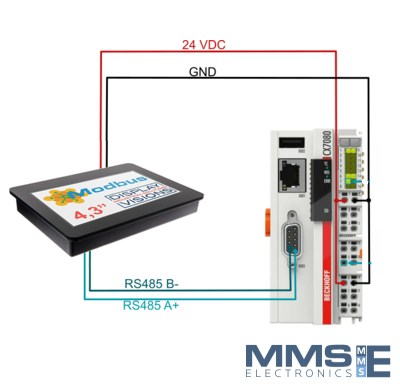
Click here to view examples on how to connect the HMI to Beckhoff CX7080, Siemens S7, Siemens Logo (External link to DISPLAY VISIONS website).
Download HMI designer software
The Modbus displays can be configured as a Slave or Master. Set up as a Slave when used with a PLCs or Master when controlling sensors, inverters or other equipment. All Modbus registers can be freely assigned to texts, numbers, bar graphs, images. Coil, discrete, input and holding are supported.
Even 32-bit float values can be elegantly transmitted for floating point calculations. Texts can be stored as fixed texts or transmitted character by character. Touch fields can be transmitted as "Discrete Input" or change a screen page directly.
The Design Process is Simple:
- Start by downloading the free uniTFTDesigner software. The uniTFTDesigner includes the HMI and PLC Designer.
- Design the user interface exactly as you imagined it using a drag-and-drop method.
- Easily place touch-buttons, pictures, text boxes, gauges, bargraphs, and keypads.
- Build multi-level navigation with menu screens to manage complex functions.
- Complete by assigning all Modbus registers.


Learn with the uniTFT / HMI / PLCDesigner software
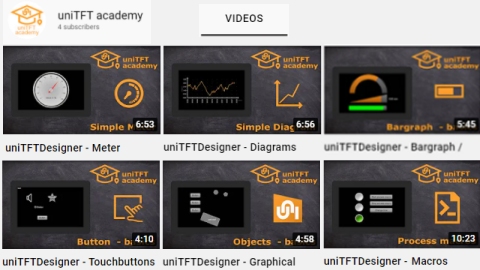
To make the experience with the uniTFT/HMI/PLCDesigner software as smooth as possible many examples are available from within the software. More educational video's are available on the DISPLAY VISIONS YouTube channel.
- Create touch buttons, radio buttons and keyboards
- Create gauge instruments and graphs
- Create string, spin boxes and bar graphs
- Create If then Else statements
- Use mathematical functions
- Use data arrays

Which HMI is right for you?
EA HMI with Modbus RTU/CTP
- Connect to any PLC with Modbus RTU/TCP
- Size: 2.8", 4.3", 7.0", 10.1", 12.0"
- Stylish enclosure with IPS colour display
- PCAP touch-screen
- High brightness display 1000cd/m²
- Create screen layouts and macro functions
- Download data to display flash memory
- Supported by the free HMI Designer software
- Supply voltage 10V .. 30V DC
- RS-485, Wi-Fi or LAN options
- If in doubt contact MMS Electronics for support
link to Modbus HMI products and datasheets
EA HMI with a SMART uniTFT display
- Size: 2.8", 4.3", 7.0", 10.1"
- Stylish enclosure with IPS colour display
- PCAP touch-screen
- High brightness display 1000cd/m²
- Control the display and the application
- Format and display incoming datastream
- Powerful graphic functions, pinch and zoom
- Supported by new uniTFTDesigner software
- Supply voltage 10V .. 30V DC
- RS-485, RS-232, Wi-Fi or LAN options
- For more info contact MMS Electronics
link to products and datasheet